01
It listens to both sides
Your microphone becomes “Me” and the call’s audio becomes “Them”, transcribed separately on the Mac. No bot joins the call; it works with any app that plays audio.

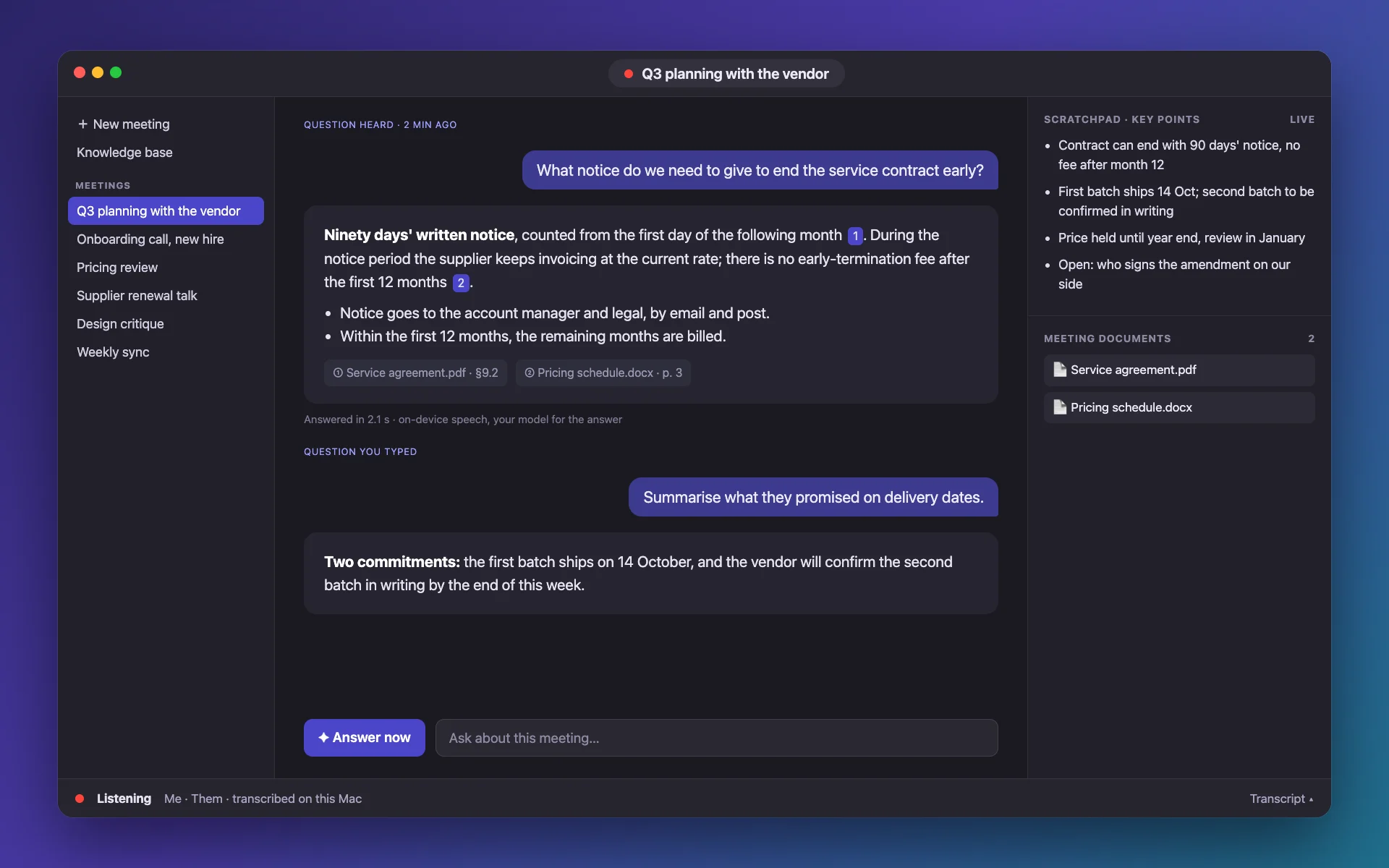
Meeting Assistant transcribes both sides of a call on your Mac, keeps live notes of the key points, and when someone asks something it answers from the documents you gave it — with the passage it came from.
Direct download · version 0.1.0 · 3.6 MB · macOS 26 or later, Apple silicon · notarized by Apple.
How it works
01
Your microphone becomes “Me” and the call’s audio becomes “Them”, transcribed separately on the Mac. No bot joins the call; it works with any app that plays audio.
02
Press ⌃⌥Space and it finds the last question asked in the recent minutes of the transcript — or type your own, about the whole meeting.
03
It searches the files you dropped in, writes a short answer and shows the passages it used. A floating panel keeps it out of the way of your call.
What is in it
Lines labelled Me and Them as they are spoken, in Italian, English, French, German, Spanish, Portuguese or Dutch, or detected automatically.
Drop PDF, Word, RTF, Markdown, text, HTML or CSV files onto a meeting, or into a knowledge base every meeting can search. Replace or remove them any time.
A live scratchpad that adds only what is new, in short bullets, tuned for each model, with a short recap when you stop.
Questions and answers stay in the meeting. Edit a question, regenerate an answer, copy it or delete it, as in any chat.
Apple’s on-device model, your ChatGPT plan, an OpenAI-compatible API or Claude. Different models can write the notes and the answers.
Each meeting is stored on your Mac with its answers, gets a short title when it ends, and exports to Markdown.
On your Mac
A SwiftUI app with a menu-bar icon that fills in while it listens. Speech recognition runs on the Neural Engine, with Apple’s built-in engine or Whisper models; your audio is never uploaded.
What leaves your Mac
There is no account and no server of ours. Pick Apple’s on-device model and nothing leaves the Mac at all.
Speech is recognized on the device. The first use of a Whisper model downloads it, about 600 MB; after that it runs offline.
To answer, the recent transcript and the matching passages go to the model you selected, and nowhere else.
API keys and sign-in tokens are stored in your Mac’s Keychain. Signing out of ChatGPT revokes the token.
Search uses a local index and on-device embeddings. Deleting a meeting deletes its documents.
Recording other people can require their consent where you live. The menu-bar icon fills in while the app is listening.
Price
Meeting Assistant costs nothing and has no subscription. The model you connect has its own terms.
Four guides, each from a different angle.
Yes. It records the audio your Mac plays and your microphone, so it works with any call app or browser tab. It does not join the call or appear as a participant.
A Mac with Apple silicon running macOS 26 or later. Answers from Apple’s on-device model also need Apple Intelligence to be available on that Mac.
The interface is in English. You can transcribe meetings in Italian, English, French, German, Spanish, Portuguese or Dutch, and choose the language of the answers.
The app labels two sources: your microphone (Me) and the call’s audio (Them). It does not tell individual remote speakers apart.
The floating panel is excluded from screen sharing and recordings using a macOS window setting. Apps differ in how they capture the screen, so try it before an important call.
The app warns you that none are loaded and that answers will be generic. When documents are loaded, it cites only passages it actually found and does not invent sources.
It depends on where you and the other people are. Many places require everyone’s consent. You are responsible for asking.
It records system audio and runs a local index, and is distributed directly as a notarized download. It is free.

Download it, drop in the documents of your next meeting, and let it listen.


